How to Put Your Blog on blog.yourdomain.com (GoDaddy, Namecheap, Squarespace & More)
Putting your blog on a subdomain — blog.yourdomain.com — is the easiest way
to host your content on your own domain. It takes one DNS record and works
with every domain provider on earth. This guide shows you exactly where to add
that record for the most common registrars.
New here? Start with the complete guide to publishing your blog on your own domain, or read subdomain vs subdirectory for SEO to decide which format is right for you.
What you're adding (the 30-second version)
You'll add one CNAME record that points blog.yourdomain.com at your hosted
blog:
- Type: CNAME
- Host / Name:
blog - Value / Target / Points to: the CNAME value shown in your Auroxa dashboard
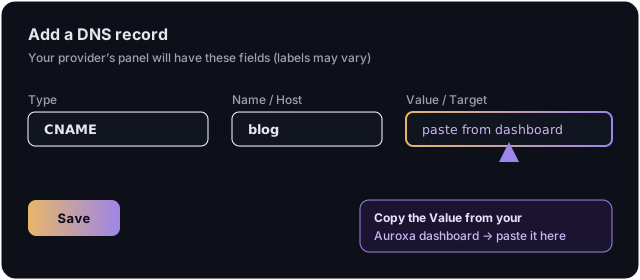
That's the whole job. No servers, no code, no reverse proxy. SSL is issued automatically once the record propagates (usually minutes). The only thing that changes between providers is where you type those three fields.
Step 1: Tell Auroxa your subdomain
In your Auroxa dashboard, open Integrations → Use your own domain, choose
Subdomain, and enter blog.yourdomain.com. Auroxa then shows you the exact
CNAME value to paste in Step 2. Keep that tab open.
Step 2: Add the CNAME at your registrar
Every provider keeps DNS records in the same place — your domain's DNS settings:
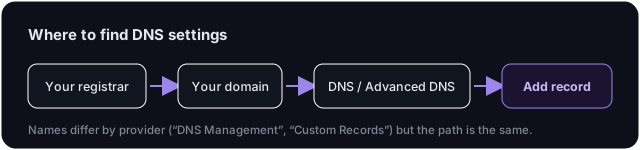
Find your provider below.
GoDaddy
- Sign in → your name (top-right) → My Products.
- Under Domains, click the ⋯ (three dots) next to your domain → Edit DNS.
- Under Records, click Add New Record → Type: CNAME.
- Name:
blog· Value: the CNAME value from your Auroxa dashboard · TTL: 1 hour (default is fine). - Save.
Namecheap
- Sign in → Domain List → Manage next to your domain → Advanced DNS.
- Add New Record → Type: CNAME Record.
- Host:
blog· Value/Target: the CNAME value from Auroxa · TTL: Automatic. - Click the green ✓ to save.
Squarespace
- Open your Domains dashboard → click your domain → DNS → DNS Settings.
- Scroll to Custom Records → Add Record → Type: CNAME (you may be asked to re-enter your password or 2FA).
- Name:
blog· Data: the CNAME value from Auroxa. - Save.
Used Google Domains? Google Domains shut down — all domains migrated to Squarespace in 2024. If your domain was on Google Domains, manage it in Squarespace and follow the steps above.
Cloudflare (as your DNS provider)
- Select your domain → DNS → Records → Add record.
- Type: CNAME · Name:
blog· Target: the CNAME value from Auroxa. - Set Proxy status to DNS only (grey cloud), not proxied. Save.
Any other provider
Look for DNS, DNS Management, Advanced DNS, or Custom Records.
Add a CNAME with host = blog and value = the CNAME value from your
Auroxa dashboard. The labels differ ("Host/Name/Alias" and "Value/Target/Points
to"), but every provider has these two fields.
Tip: Most providers want only the label
blogin the Host field — not the fullblog.yourdomain.com. If yours rejectsblog, try the full hostname.
Step 3: Verify
Back in Auroxa, click Verify. Auroxa checks the DNS record and issues the SSL
certificate. Once DNS propagates — usually a few minutes, occasionally up to an
hour — blog.yourdomain.com goes live with a padlock. Done.
Troubleshooting
"Verify" says it can't find the record. DNS can take time to propagate. Wait 5–10 minutes and try again. Double-check there are no typos and that the Type is CNAME (not A).
My provider won't let me CNAME because there's already a record on blog.
Remove or edit the conflicting record on the blog host first — you can only have
one CNAME per hostname.
I see "too many redirects" or a cert warning. If you're on Cloudflare DNS, set the record to DNS only (grey cloud), not Proxied (orange cloud).
Frequently asked questions
Do I need to be technical to add a subdomain? No. It's a single DNS record — copy two values into two fields in your provider's DNS panel. Most people finish in under five minutes.
Why can't I just see the CNAME value here? For security we show your exact CNAME target inside your dashboard rather than in public docs. Open Integrations → Use your own domain → Subdomain and it's right there to copy.
Can I use news or learn instead of blog?
Yes — use any label you like (news.yourdomain.com, insights.yourdomain.com).
Put that label in the Host field instead of blog.
Will a subdomain hurt my SEO versus a subdirectory? Barely. A subdomain consolidates almost as well and is far easier. See subdomain vs subdirectory for SEO for the honest trade-off.
Ready to host your blog on your own domain? Run a free SEO audit and get started.
Ivan Krouguer writes about SEO, local search, and getting found online — founder-led and AI-augmented at Auroxa. More about Auroxa →