Add a Blog at yourdomain.com/blog with Netlify (Proxy Redirects)
On Netlify, a redirect with status = 200 acts as a proxy (also called a
rewrite): the URL stays yourdomain.com/blog while the content is served from
your Auroxa blog. That gives you the strongest SEO setup — a true subdirectory —
with a few lines of config.
New here? Start with the complete guide to publishing on your own domain and subdomain vs subdirectory.
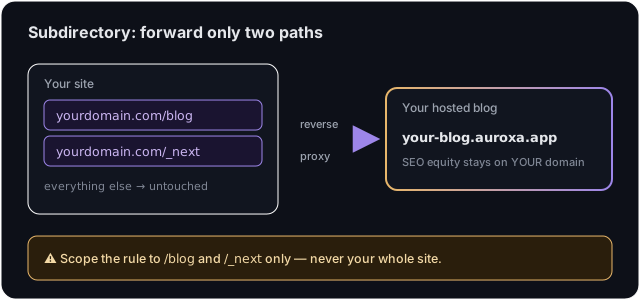
⚠️ Scope it tightly. Proxy only
/blogand/_next— never your whole site. And if your main Netlify site is itself a Next.js app,/_nextwill collide with its assets; use the subdomain route instead.
Step 1: Get your Auroxa origin
In Auroxa: Integrations → Use your own domain → Subdirectory, enter your
domain, copy the origin shown (e.g. yourcompany.auroxa.app).
Step 2: Add the proxy redirects
In netlify.toml at your repo root, add:
[[redirects]]
  from = "/blog/*"
  to = "https://your-blog.auroxa.app/blog/:splat"
  status = 200
  force = true

[[redirects]]
  from = "/_next/*"
  to = "https://your-blog.auroxa.app/_next/:splat"
  status = 200
  force = true
Replace your-blog.auroxa.app with your origin. status = 200 is what makes this
a proxy (not a visible 301/302). force = true ensures it wins over any static
file at the same path.
Prefer a
_redirectsfile? The equivalent lines are:/blog/* https://your-blog.auroxa.app/blog/:splat 200!and/_next/* https://your-blog.auroxa.app/_next/:splat 200!
Step 3: Deploy & verify
Commit and deploy. Then in Auroxa click Verify — it fetches
https://yourdomain.com/blog/auroxa-proxy-check to confirm the proxy. Visit
yourdomain.com/blog to see it live.
Troubleshooting
It redirects instead of proxying (URL changes). You're missing status = 200
(or the 200! bang in _redirects). With a 200 the URL stays put.
Blog loads unstyled. Add the /_next/* rule — assets live there.
Verify fails. Make sure force = true is set, the deploy finished, and the
to host matches your dashboard origin.
Frequently asked questions
Does this work on Netlify's free Starter plan? Yes — proxy redirects are available on all Netlify plans.
Will it interfere with my existing redirects?
Order matters: Netlify uses the first matching rule. Place these two near the top,
and avoid a catch-all /* above them.
How do I undo it? Delete the two redirect blocks and redeploy. Your site reverts immediately.
Want the strongest SEO setup, verified safe? Start with a free SEO audit.
Ivan Krouguer writes about SEO, local search, and getting found online — founder-led and AI-augmented at Auroxa. More about Auroxa →