Add a Blog at yourdomain.com/blog with Nginx (proxy_pass)
If you run your own server (a VPS, a dedicated box, or a self-managed app behind
Nginx), you can add a subdirectory blog with a single location block. This
is the strongest SEO setup — yourdomain.com/blog served from your Auroxa blog,
the rest of your site untouched.
New here? Start with the complete guide to publishing on your own domain and subdomain vs subdirectory.
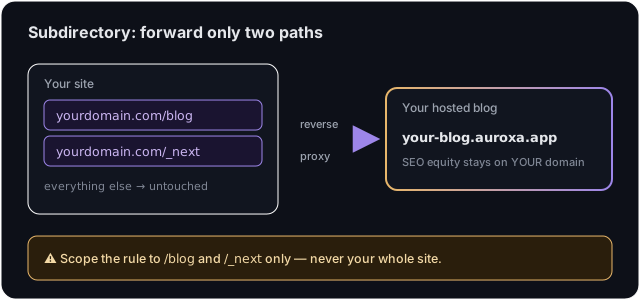
⚠️ Scope it precisely. The block below matches only
/blog,/blog/*, and/_next/*. Do not widen it tolocation /. And if your own app already serves assets under/_next, that path collides — use the subdomain route instead.
Step 1: Get your Auroxa origin
In Auroxa: Integrations → Use your own domain → Subdirectory, enter your
domain, and copy the origin shown (e.g. yourcompany.auroxa.app). You'll use it
in two places below — the proxy_pass URL and the Host header.
Step 2: Add the location block
Inside your existing server { ... } block for yourdomain.com, add:
# Matches /blog, /blog/*, and /_next/* only — nothing else on your site.
location ~ ^/(blog$|blog/|_next/) {
    proxy_pass               https://your-blog.auroxa.app;
    proxy_set_header Host    your-blog.auroxa.app;
    proxy_ssl_server_name    on;
    proxy_set_header X-Forwarded-Host $host;
}
Replace both instances of your-blog.auroxa.app with your origin. The Host
header must be your Auroxa origin (not your own domain) so Auroxa resolves the
correct tenant; X-Forwarded-Host carries your real domain through for canonical
URLs.
Step 3: Test the config and reload
sudo nginx -t          # validate — must say "syntax is ok"
sudo systemctl reload nginx
reload applies the change with zero downtime. If nginx -t reports an error,
fix it before reloading.
Step 4: Verify
In Auroxa, click Verify — it fetches
https://yourdomain.com/blog/auroxa-proxy-check to confirm the proxy. Then visit
yourdomain.com/blog.
Troubleshooting
502 / 525 / SSL handshake errors. Ensure proxy_ssl_server_name on; is
present (Auroxa's edge needs SNI) and that proxy_pass uses https://.
Wrong site / 404 from the origin. The Host header is wrong — it must be your
exact Auroxa origin, not yourdomain.com.
Blog renders unstyled. Your regex isn't catching /_next/ — confirm the
location ~ ^/(blog$|blog/|_next/) line is intact.
Frequently asked questions
Does this work with Apache too?
Yes, the concept is identical — use ProxyPass/ProxyPassReverse for /blog and
/_next with SSLProxyEngine on and the origin as the Host. The Nginx block
above is the cleanest reference.
Will it affect the rest of my site's performance?
No. The location block only matches blog paths; all other requests are served by
your existing config.
How do I undo it?
Delete the location block, run nginx -t, and reload. Your site reverts
immediately.
Want it done right, checked for safety before go-live? Start with a free SEO audit.
Ivan Krouguer writes about SEO, local search, and getting found online — founder-led and AI-augmented at Auroxa. More about Auroxa →