Add a Blog at yourdomain.com/blog with Vercel (Rewrites)
Hosting your blog at yourdomain.com/blog gives you the strongest SEO
consolidation. If your main site runs on Vercel, you can add the proxy with a
few lines in vercel.json — no servers, no extra services.
New here? Start with the complete guide to publishing on your own domain, and see subdomain vs subdirectory to confirm subdirectory is right for you.
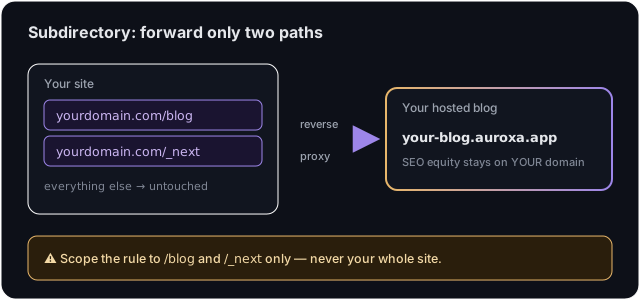
⚠️ Important Vercel caveat: if your main site is itself a Next.js app on Vercel, the
/_nextrewrite below will collide with your own app's assets. In that case, use the subdomain route instead — it's purpose-built for exactly this situation. The rewrite approach below is for non-Next.js sites hosted on Vercel.
Step 1: Get your Auroxa origin
In Auroxa, open Integrations → Use your own domain → Subdirectory, enter your
domain, and copy the origin it shows (e.g. yourcompany.auroxa.app).
Step 2: Add the rewrites
In your project's vercel.json (create it at the repo root if it doesn't exist),
add:
{
  "rewrites": [
    { "source": "/blog/:path*", "destination": "https://your-blog.auroxa.app/blog/:path*" },
    { "source": "/_next/:path*", "destination": "https://your-blog.auroxa.app/_next/:path*" }
  ]
}
Replace your-blog.auroxa.app with your origin. If you already have a rewrites
array, append these two entries — don't add a catch-all /(.*) rule.
Step 3: Deploy
Commit and push (or run vercel --prod). Vercel applies the rewrites on the next
deploy. Only /blog and /_next are proxied; the rest of your site is untouched.
Step 4: Verify
In Auroxa, click Verify. It fetches https://yourdomain.com/blog/auroxa-proxy-check
and confirms the proxy. When it passes, visit yourdomain.com/blog to see it
live.
Troubleshooting
Blog is unstyled. The /_next/:path* rewrite is missing or misspelled — add
it. Assets live under /_next.
My app's own pages broke after deploy. You likely added a broad rewrite. Keep only the two scoped rules above.
Verify fails. Confirm the deploy finished, the destination host exactly
matches your dashboard origin, and there's no conflicting redirect on /blog.
Frequently asked questions
Does this work on Vercel's Hobby (free) plan?
Yes — vercel.json rewrites are available on all plans.
Can I keep my existing redirects and headers?
Yes. Add these two rewrites alongside your existing config; just avoid a catch-all
that swallows /blog.
How do I undo it? Remove the two rewrite entries and redeploy. Your site reverts immediately.
Want it set up for maximum SEO? Start with a free SEO audit.
Ivan Krouguer writes about SEO, local search, and getting found online — founder-led and AI-augmented at Auroxa. More about Auroxa →