Add a Blog at yourdomain.com/blog with Cloudflare (Reverse Proxy)
A subdirectory (yourdomain.com/blog) is the strongest SEO setup for a hosted
blog — all the authority consolidates into your root domain. On Cloudflare you
can set it up in minutes with a small Worker that forwards just your blog traffic
to Auroxa. This guide walks through it safely.
First time here? Read the complete guide to publishing on your own domain and subdomain vs subdirectory for context. If your domain isn't on Cloudflare yet, see how to route any domain through Cloudflare for free first.
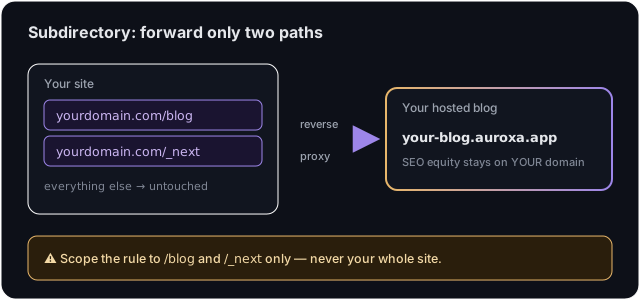
How it works
A reverse proxy quietly forwards two paths — /blog (your articles) and /_next
(their assets) — to your Auroxa blog, while every other page on your site stays
exactly as it is. Visitors and Google only ever see yourdomain.com/blog.
⚠️ Before you start — the one rule that matters: scope the proxy to
/blogand/_nextonly. Never run it on your whole site (/*) — that would route all your traffic through Auroxa and could take your site down during an upstream incident. And if your main site is itself a Next.js app,/_nextwill collide with its assets — use the subdomain route instead.
Step 1: Get your Auroxa origin
In Auroxa, open Integrations → Use your own domain → Subdirectory and enter
your domain. Auroxa shows your exact origin (something like
yourcompany.auroxa.app) and a ready-to-paste Worker. Copy your origin — you'll
substitute it below.
Step 2: Create the Worker
In the Cloudflare dashboard: Workers & Pages → Create → Create Worker. Name it
auroxa-blog-proxy, click Deploy, then Edit code and paste:
// Auroxa blog reverse proxy — serves your hosted blog at yourdomain.com/blog
// SAFETY: scope the Worker Route to "/blog*" and "/_next/*" ONLY (Step 3).
const AUROXA_ORIGIN = 'https://your-blog.auroxa.app'; // ← your exact origin from the dashboard

export default {
  async fetch(request) {
    const url = new URL(request.url);
    const isBlog = url.pathname === '/blog' || url.pathname.startsWith('/blog/');
    const isAsset = url.pathname.startsWith('/_next/');
    if (!isBlog && !isAsset) return fetch(request); // not ours — your site, untouched
    const headers = new Headers(request.headers);
    headers.delete('host'); // let the origin resolve the tenant by its own host
    return fetch(AUROXA_ORIGIN + url.pathname + url.search, { method: request.method, headers, redirect: 'manual' });
  },
};
Replace your-blog.auroxa.app with your origin and Deploy.
Step 3: Scope the routes (do not skip)
Go to your Worker → Settings → Domains & Routes → Add → Route. Add two routes, both on your zone:
yourdomain.com/blog*yourdomain.com/_next/*
Do not add yourdomain.com/*. The two scoped routes are what keep the rest of
your site untouched.
Step 4: Verify
Back in Auroxa, click Verify. Auroxa fetches
https://yourdomain.com/blog/auroxa-proxy-check and confirms it round-trips to
your blog. When it passes, your blog is live at yourdomain.com/blog. You can
sanity-check yourself by visiting yourdomain.com/blog in a browser.
Troubleshooting
Verify fails / 522 / loop. Make sure the routes are /blog* and /_next/*
(not /*), the Worker is deployed, and AUROXA_ORIGIN exactly matches the
origin shown in your dashboard.
My homepage broke. You almost certainly added a /* route. Delete it; keep
only the two scoped routes. Your site reverts instantly.
Blog loads but looks unstyled. The /_next/* route is missing — assets aren't
being forwarded. Add it.
Frequently asked questions
Is Cloudflare's free plan enough? Yes. A free Cloudflare account with Workers covers this for typical blog traffic.
Will this slow down the rest of my site?
No. The Worker only runs on /blog and /_next. Every other request bypasses it
entirely.
How do I undo it?
Delete the two Worker routes (or the Worker). Your site reverts immediately — and
in Auroxa you can disconnect to fall back to your *.auroxa.app blog.
Want the strongest SEO setup done right? Start with a free SEO audit.
Ivan Krouguer writes about SEO, local search, and getting found online — founder-led and AI-augmented at Auroxa. More about Auroxa →