How to Route Any Domain Through Cloudflare for Free (the Universal Unlock)
A subdirectory blog (yourdomain.com/blog) needs a reverse proxy, and a plain
registrar's DNS — GoDaddy, Namecheap, most basic hosts — can't do that. DNS
routes a whole hostname, never a single path like /blog. The fix that works for
any domain: point your domain's nameservers at Cloudflare (free), then
use a Cloudflare Worker to do the proxy.
This is the universal unlock — it makes the strongest SEO setup available even if your registrar can't proxy. For background, see the complete guide to publishing on your own domain and subdomain vs subdirectory.
Just want it live fast, no nameserver changes? Use a subdomain (
blog.yourdomain.com) instead — one DNS record, works on your current registrar, nearly the same SEO. Come back here when you want a true subdirectory.
What "moving nameservers" actually does (and doesn't)
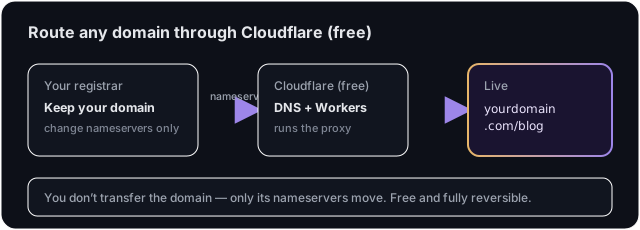
You are not transferring your domain registration — you keep it where it is (GoDaddy, Namecheap, wherever). You're only changing which servers answer your domain's DNS. Cloudflare becomes your DNS host, which unlocks Workers (the proxy). It's free and reversible.
⚠️ Heads-up: nameservers control all of your domain's DNS — your website, email (MX), and any other records. Cloudflare imports your existing records automatically, but you should verify every record carries over (especially email/MX) before and after the switch, so nothing breaks.
Step 1: Add your domain to Cloudflare
- Create a free account at cloudflare.com → Add a site → enter
yourdomain.com. - Choose the Free plan.
- Cloudflare scans and imports your existing DNS records. Review the list
against your current registrar's DNS — confirm your
A/CNAME(website) andMX/TXT(email, verification) records are all present. Add any that are missing.
Step 2: Change your nameservers at your registrar
Cloudflare shows you two nameservers (e.g. xxx.ns.cloudflare.com). At your
registrar (not Cloudflare), replace the existing nameservers with
Cloudflare's:
- GoDaddy: Domain → Nameservers → Change → Enter my own nameservers → paste both.
- Namecheap: Domain List → Manage → Nameservers → Custom DNS → paste both.
- Others: look for Nameservers / DNS / DNS servers and choose "custom" or "use my own".
Save. Propagation usually takes minutes to a few hours; Cloudflare emails you when your domain is Active.
Step 3: Deploy the blog Worker
Once Cloudflare shows your domain as Active, follow the Cloudflare
subdirectory guide to deploy the Worker
and scope the routes to /blog* and /_next/*. That guide has the exact Worker
code and the safety steps.
Step 4: Verify
In Auroxa, click Verify — it fetches
https://yourdomain.com/blog/auroxa-proxy-check to confirm the proxy. Then visit
yourdomain.com/blog.
Troubleshooting
My email stopped working after the switch. An MX (or related TXT) record
didn't carry over. Re-add your mail provider's records in Cloudflare DNS — compare
against your old registrar's DNS export.
Cloudflare still says "Pending nameserver update." The registrar change hasn't propagated yet, or one nameserver was mistyped. Re-check both values at your registrar and wait.
Website went down right after switching. Your site's A/CNAME record is
missing or set to Proxied when it should be DNS only (or vice-versa). Match
what your old DNS had.
Frequently asked questions
Is Cloudflare really free for this? Yes. A Free plan covers DNS and Workers for a typical blog. You don't need a paid plan to run the subdirectory proxy.
Do I lose my domain or have to transfer it? No. You keep your registration where it is. You're only changing nameservers (DNS), which is free and fully reversible — switch them back any time.
Is this safe for my main website and email? Yes, if you verify your records carried over. Cloudflare imports them automatically; just confirm your website and email (MX) records are present before and after the switch.
Why not just use a subdomain?
You can — it's easier and needs no nameserver change. Use this route only when you
specifically want a true yourdomain.com/blog subdirectory. See subdomain vs
subdirectory.
Want the strongest SEO setup on your domain? Start with a free SEO audit.
Ivan Krouguer writes about SEO, local search, and getting found online — founder-led and AI-augmented at Auroxa. More about Auroxa →